Monthly Seasonality AnalyzerThis indicator analyzes historical performance/seasonality of a chosen month, from date of inception to present. Users can choose any calendar month via dropdown menu.
For each historical month selected, it will calculate the monthly percentage gain/loss, range(volatility), and average gain/loss percentage, average range percentage across all recorded years. Positive returns are colored green and negative returns are red. Also, calculates if the selected month was bullish(open>close) or bearish.
When current chart month matches the selected month, it shows the in-progress range as well.
Data is collected from 1930 to present. Results are shown in vertical and horizontal tables. If the vertical table exceeds a 36 years, the script automatically switches to horizontal table to display all the data, with option to change table position.
Overall this tool is valuable for seasonality research, such as Santa Rally, May Go Away and swing trading/ position trading to capture the monthly PO3 range.
Most seasonality indicators show all 12 months at once or use daily bars. This one zooms in deeply on one month only, providing detailed per-year breakdowns, accurate completed-month stats, and a practical live range display.
The script uses arrays to store years, gains, and ranges. Uses table.new(), table.cell(), table.merge_cells() for easily readable result display. Code handles the current in-progress month separately (shows live range without including it in historical averages).
**Script will not run on any timeframe other than monthly and displays error otherwise. Script is best used on spot and not futures.
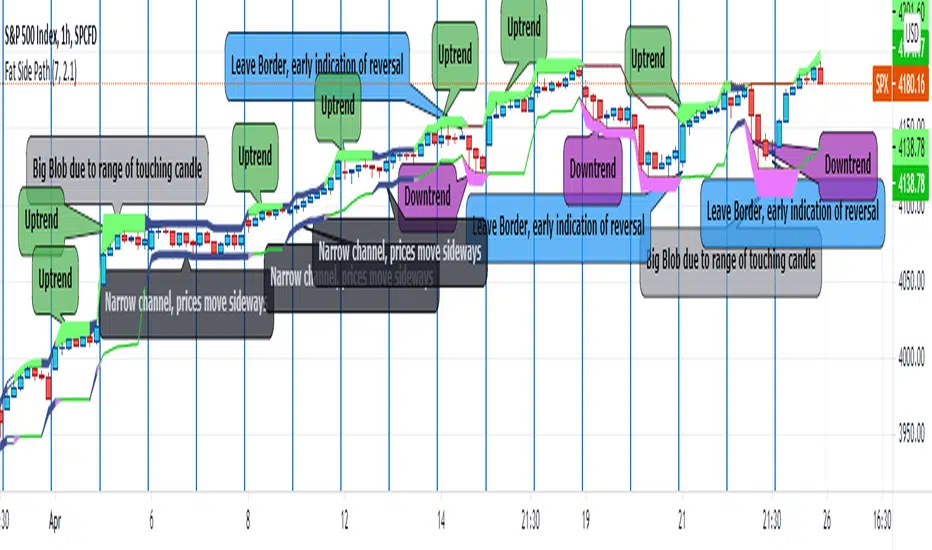
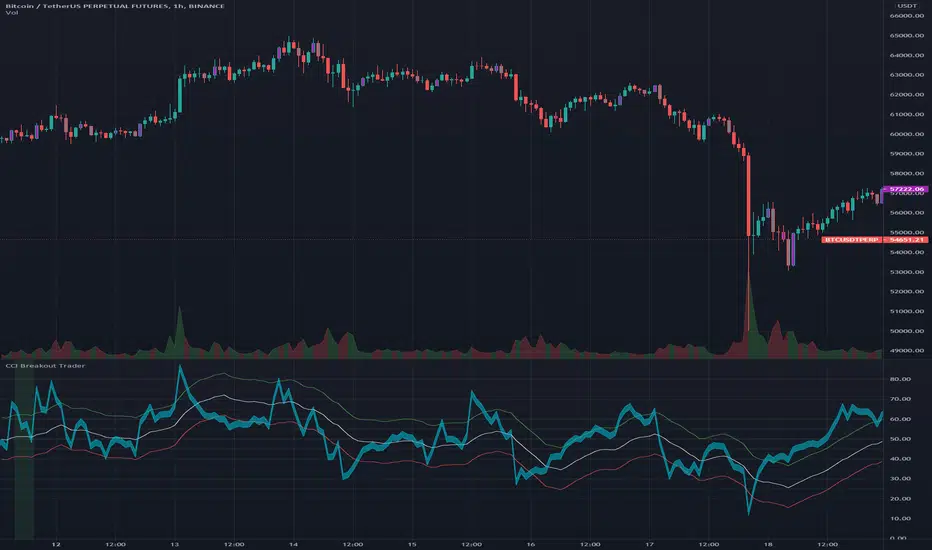
"swing trading" için komut dosyalarını ara
Previous Periods Highs and Lows + LabelsThis indicator plots the high and low prices from the previous Day, Week, and Month as horizontal lines on any timeframe chart. It provides clear visual reference to key historical support and resistance levels commonly used by traders for: breakout and reversal identification
stop-loss placement
target setting
Features include distinct colors for each period and optional price labels displayed on the right side of the chart for quick reference.Simple, non-repainting, and optimized for both intraday and swing trading setups.
Wick Analysis Chart [LTS]Wick Analysis Chart - Advanced Price Rejection Visualization
Overview
The Wick Analysis Chart is a specialized oscillator that measures and visualizes price rejection strength by analyzing candle wicks relative to their body sizes. Unlike traditional wick analysis that uses raw price differences, this indicator converts wick measurements into percentage ratios, making them comparable across different instruments, timeframes, and market conditions.
The indicator emphasizes significant price rejections by incorporating volume-weighted calculations with selectable scaling methods (linear, logarithmic, or square root), while filtering out noise through multiple customizable filters including ATR-based volatility filtering, wick size thresholds, and doji detection.
What Makes This Original
This indicator combines several unique analytical approaches not commonly found together:
Percentage-based wick ratios rather than absolute price measurements, enabling cross-instrument and cross-timeframe comparisons
Volume weighting applied BEFORE filtering to ensure high-volume rejections aren't excluded
Three distinct volume scaling methods (linear, logarithmic, square root) to accommodate different trading styles and prevent chart compression
Multi-layer filtering system combining ATR volatility thresholds, minimum wick size requirements, and doji detection
Intelligent plot ordering that ensures smaller wick components remain visible when displaying both upper and lower wicks simultaneously
Color-coded rejection direction showing bullish rejections (lower wick dominant) versus bearish rejections (upper wick dominant)
How It Works
Core Calculation
The indicator calculates wick-to-body ratios as percentages:
Total Wick % = (Upper Wick + Lower Wick) / Body Size × 100
Upper Wick % = Upper Wick / Body Size × 100
Lower Wick % = Lower Wick / Body Size × 100
A 200% total wick value means the combined wicks are twice the size of the candle body, indicating strong price rejection.
Volume Weighting
Volume weighting is applied to emphasize rejections that occur on significant volume. The indicator offers three scaling methods:
Linear Scaling: Direct volume multiplier (2x volume = 2x display value). Best for dramatic emphasis on volume spikes. Suitable for scalping and intraday trading where volume surges signal important levels.
Logarithmic Scaling: Diminishing returns on extreme volume using the formula: multiplier = 1 + log(volume ratio). A 10x volume spike produces only ~3.3x emphasis. Best for preventing chart compression while maintaining volume awareness. Ideal for swing trading and multi-timeframe analysis.
Square Root Scaling: Balanced approach using square root of volume ratio. A 4x volume spike produces 2x emphasis. Provides middle ground between linear and logarithmic. Suitable for most day trading applications.
Filtering System
Three independent filters work together to eliminate noise:
ATR Filter: Removes candles whose total range is below a specified percentage of the Average True Range. This filters out low-volatility consolidation periods, focusing analysis on meaningful price movements.
Wick Size Filter: Removes candles whose volume-weighted wick percentage is below the threshold. This ensures only significant rejections are displayed, even if the candle met the ATR requirement.
Doji Filter: Automatically filters candles where the body is smaller than the specified percentage of total range. Doji candles produce extreme wick ratios that can skew the chart scale.
Calculation Flow
1. Calculate base wick-to-body percentages
2. Apply volume weighting using selected scaling method
3. Check ATR filter (if enabled)
4. Check wick size filter using volume-weighted values (if enabled)
5. Check doji filter
6. Display final values if all filters pass
How To Use
Display Configuration
Total Wick Value: Shows combined upper and lower wick size. Color indicates rejection direction - green when lower wick dominates (buyers rejected downside), red when upper wick dominates (sellers rejected upside).
Upper Wick Value: Isolated upper wick measurement. Useful for identifying supply zones and resistance rejection.
Lower Wick Value: Isolated lower wick measurement. Useful for identifying demand zones and support rejection.
When both upper and lower wicks are displayed simultaneously, the indicator automatically plots them in size order so the smaller value remains visible.
Volume Weighting Setup
Enable volume weighting and select your preferred scaling method based on trading style:
Linear: Maximum emphasis on volume, accepts potential chart compression
Logarithmic: Minimal chart compression, subtle volume emphasis
Square Root: Balanced approach for most applications
Adjust Volume Average Length based on your timeframe (shorter for intraday, longer for swing trading).
Filter Configuration
ATR Filter: Start with 80% to focus on above-average volatility moves. Increase to 100%+ for only the most volatile candles, or decrease to 60-70% to include more data.
Wick Size Filter: Start with 50% to show wicks at least half the body size. Increase to 75-100% for only the most significant rejections, or decrease to 25% for more sensitivity.
Doji Threshold: Default 5% works well for most markets. Increase for markets with frequent small-bodied candles.
Reference Levels
100% Line (Equilibrium): Represents 1:1 wick-to-body ratio. Values above this line indicate wicks larger than the body.
Extreme Level: User-defined threshold for alerts. Default 500% means wicks are 5x the body size. Adjust based on your instrument and filter settings with volume weighting enabled.
Trading Applications
Identifying Key Levels: Large wick percentages with high volume often mark important support/resistance levels where significant orders absorbed price movement.
Trend Exhaustion: Increasing wick percentages at trend extremes, especially with declining volume weighting, can signal momentum loss.
Breakout Validation: Breakout candles with small wicks (low percentage values) suggest conviction, while large wicks suggest rejection and potential false breakouts.
Session Analysis: Compare wick percentages across different trading sessions to identify when the most significant rejections occur.
Mean Reversion Setups: Extreme wick percentages above your threshold level, particularly when colored green (bullish rejection) at support or red (bearish rejection) at resistance, can signal high-probability reversal zones.
Alerts
The indicator includes an alert condition that triggers when the total wick value exceeds the extreme level. Configure the extreme level based on your backtesting to match your instrument's characteristics and filter settings.
Settings Summary
Display Options
Show Total/Upper/Lower Wick Value: Toggle visibility
Color selections for bullish/bearish total wicks and upper/lower components
Volume Weighting
Apply Volume Weighting: Enable/disable volume emphasis
Volume Average Length: Period for volume SMA comparison (default: 20)
Volume Scaling Method: Linear/Logarithmic/Square Root
ATR Filter
Apply ATR Filter: Enable/disable volatility-based filtering
ATR Length: Period for ATR calculation (default: 14)
Filter Percent: Minimum candle range as % of ATR (default: 80%)
Wick Size Filter
Apply Wick Size Filter: Enable/disable wick size threshold
Minimum Wick %: Minimum volume-weighted wick percentage (default: 50%)
Advanced
Doji Threshold: Body size as % of range for doji detection (default: 5%)
Reference Levels
Show Reference Levels: Toggle horizontal reference lines
Extreme Level: Threshold for extreme wick values and alerts (default: 500%)
Support & Resistance Automated📌 Support and Resistance Automated (Pivot-Based)
Support and Resistance Automated is a lightweight and fully automated indicator that plots key support and resistance levels using pivot highs and pivot lows. It helps traders quickly identify important price reaction zones without manual drawing.
This indicator is especially useful for price-action traders, swing traders, and intraday traders who rely on clean charts and objective levels.
🔍 How It Works
Pivot Highs → Resistance Levels
Pivot Lows → Support Levels
Each detected pivot creates a horizontal dotted line that extends forward, allowing you to observe how price reacts over time.
Once a level is formed, it is kept permanently on the chart — no repainting, no disappearing levels.
⚙️ Customizable Settings
You can easily adjust:
Left & Right Pivot Bars – control how strong a pivot must be
Line Extension Length
Line Width
Support & Resistance Colors
Show / Hide Pivot Highs and Pivot Lows independently
This flexibility allows the indicator to adapt to intraday, swing, or higher-timeframe analysis.
✅ Key Features
✔ Fully automatic support & resistance detection
✔ Based on proven pivot-point logic
✔ No repainting
✔ Clean, minimal chart appearance
✔ Unlimited support & resistance levels
✔ Works on all timeframes & instruments
📈 Best Use Cases
Identifying key demand and supply zones
Planning entries, targets, and stop-losses
Confluence with price action, RSI, moving averages
Breakout and rejection-based strategies
A Humbled Trader Strategy + ChecklistHumbled Trader Swing Strategy + Checklist
This indicator is a complete swing trading system based on the high-probability strategies popularized by Humbled Trader. It is designed to help traders identify trend breakouts and low-risk momentum pullbacks on the Daily Timeframe.
The script combines trend filtering, automated resistance lines, and specific entry triggers into a single chart overlay, complete with a real-time Strategy Checklist Dashboard to confirm your setups instantly.
🎯 Core Components
Trend Filter (Purple Line): The 200 Simple Moving Average (SMA). This acts as your long-term trend filter. We only look for long trades when the price is above this line.
Momentum Guide (Orange Line): The 8 Exponential Moving Average (EMA). This tracks short-term momentum. In a strong trend, price will "ride" this line. We look to enter when price pulls back to touch this area.
Multi-Month Resistance (Orange Horizontal Line): Automatically plots the highest price over the last X Months (adjustable). This helps you instantly visualize the key level the stock needs to break out from.
Checklist Dashboard: A real-time table that evaluates Trend, Resistance, and Momentum conditions to give you a clear "✅ ENTER", "🚀 GAP UP", or "⏳ WAIT" signal.
🛠 How It Works
This indicator scans for two specific setups:
1. The Daily Gap Up ("GAP" Label) This signal appears when a stock shows strong momentum by gapping up overnight.
Condition: The stock opens at least 3% higher (adjustable) than the previous day's Close AND opens above the previous day's High.
Trend: Must be above the 200 SMA.
Visual: Marked with a green "GAP" label on the chart.
2. The Trend Pullback ("ENTER" Signal) This is a trend-following entry that lets you join an existing move with lower risk.
Condition: The stock is in an uptrend but dips down to touch or test the 8 EMA.
Validation: The candle must show a "dip" (red candle or lower close) to ensure we are buying a pullback, not chasing a top.
Visual: The Dashboard "Action Signal" will turn orange and display "✅ ENTER".
📋 The Checklist Dashboard
Located in the corner of your chart, this table provides a live status report for the current bar:
Trend (> 200 SMA):
🟢 Bullish: Price is in an uptrend. Safe to look for entries.
🔴 Bearish: Price is below the 200 SMA. Stay away.
Above Resistance?:
🟢 Breakout: Price has cleared the multi-month resistance line.
⚪ ---: Price is currently below the key breakout level.
Near 8 EMA?:
🟢 Yes: Price is near the "value zone" (8 EMA) for a potential pullback entry.
Action Signal:
🚀 GAP UP: Strong momentum gap detected.
✅ ENTER: Valid pullback entry detected.
⏳ WAIT: No clear setup found.
⚙️ Settings
Momentum EMA Length: Default is 8. Controls the sensitivity of the pullback line.
Trend SMA Length: Default is 200. The standard for long-term trend filtering.
Gap Up % Threshold: Default is 3.0%. Minimum overnight gap size required to trigger a signal.
Resistance Lookback (Months): Default is 3. The script will look back this many months to find and draw the key resistance line.
Table Position: Move the checklist to any corner of your screen.
⚠️ Disclaimer
This tool is for educational purposes only and does not constitute financial advice. Always manage your risk and use a stop loss.
Piv X# Piv X Pro - Multi-Layer Reversal Detection System
## Overview
Piv X Pro is an advanced technical analysis indicator that combines dynamic pivot detection, Williams %R momentum divergence analysis, and multiple VWAP anchoring methods to identify high-probability mean reversion opportunities. Unlike simple indicator combinations, this script implements a layered filtration system where each component validates and refines signals from the previous layer, resulting in significantly fewer but higher-quality reversal setups.
## Core Methodology
### 1. Dynamic ATR-Based Pivot Detection
The script uses an adaptive pivot detection algorithm that adjusts sensitivity based on market volatility. Instead of fixed lookback periods, pivot strength is calculated dynamically using Average True Range (ATR):
**Calculation:** `pivot_strength = max(min_strength, min(ATR / mintick * multiplier, max_strength))`
This ensures:
- More sensitive pivots in low volatility (smaller ATR)
- More significant pivots in high volatility (larger ATR)
- Automatic adaptation across different market conditions and timeframes
**Significance Filtering:** Pivots must exceed a minimum ATR distance from recent price action (default 0.3 ATR) to filter noise. This prevents minor price fluctuations from being marked as significant pivots.
**Volume Confirmation (Optional):** Pivots can optionally require volume spikes (default 1.5x average volume) to ensure institutional participation.
### 2. Williams %R Momentum Divergence Engine
The script detects classic and hidden divergences between price pivots and Williams %R oscillator readings:
**Bullish Divergence Detection:**
- Price makes a lower low (confirmed pivot low)
- Williams %R makes a higher low (momentum improving)
- Divergence occurs in oversold zone (Williams %R ≤ -80)
- Lookback range: 60 bars maximum
**Bearish Divergence Detection:**
- Price makes a higher high (confirmed pivot high)
- Williams %R makes a lower high (momentum weakening)
- Divergence occurs in overbought zone (Williams %R ≥ -20)
- Lookback range: 60 bars maximum
**Divergence-Anchored VWAPs:** When a divergence is detected, a new VWAP calculation begins from that point, tracking institutional positioning relative to the momentum shift. This provides a dynamic mean reversion target that resets at each confirmed divergence.
### 3. Confluence Scoring System
Each detected pivot receives a numerical score (0-150+ points) based on multiple independent confirmation factors:
**Scoring Components:**
- Base Pivot Detection: 10 points
- Volume Spike Confirmation: 15 points
- Higher Timeframe Trend Alignment (4H EMA): 20 points
- RSI Extreme Levels (oversold/overbought): 25 points
- Mean Reversion Distance (>2.5 ATR from HTF MA): 20 points
- Exhaustion Patterns (price move + volume spike): 10 points
- ATR Price Confirmation: 10 points
- RSI Divergence: 15 points
- Swing Failure Pattern (SFP): 15 points
- Liquidity Sweep: 10 points
- Candle Reversal Confirmation: 10 points
- Key Level Alignment (previous day/week highs/lows): 10 points
- Fair Value Gap (FVG) Fill: 10 points
- Session Weighting (London/NY sessions): 10 points
- Multi-Timeframe Pivot Confluence: 15 points
**Zone Classification:**
- Regular Zones: Score 60-89 (green/purple boxes)
- Golden Zones: Score 90+ (yellow boxes with thicker borders)
Higher scores indicate stronger confluence and higher probability setups, but no prediction is guaranteed.
### 4. Mean Reversion Distance Filter
The script calculates how far price has stretched from the higher timeframe moving average:
**Calculation:** `distance_from_htf_ma = (close - HTF_EMA) / ATR`
**Mean Reversion Condition:**
- For long setups: Price >2.5 ATR below HTF EMA when HTF trend is up
- For short setups: Price >2.5 ATR above HTF EMA when HTF trend is down
This ensures pivots are only highlighted when price is statistically stretched and likely to revert toward the mean.
### 5. Multi-Period VWAP Framework
The script provides multiple VWAP calculations for different analysis purposes:
**Extreme VWAPs:**
- Bottom VWAP: Anchored to the absolute lowest low in the lookback period (default 50 bars)
- Top VWAP: Anchored to the absolute highest high in the lookback period
**Periodic VWAPs:**
- 4D VWAP: Resets every 4 days
- 9D VWAP: Resets every 9 days
- 4H VWAP: Resets every 4 hours
- 8H VWAP: Resets every 8 hours
- Weekly VWAP: Resets at the start of each week
- Monthly VWAP: Resets at the start of each month
- Yearly VWAP: Resets at the start of each year
**Previous Period VWAPs:**
- Previous Weekly, Monthly, and Yearly VWAPs are displayed as reference levels for support/resistance
**Divergence VWAPs:**
- Bullish Divergence VWAP: Resets at each bullish Williams %R divergence
- Bearish Divergence VWAP: Resets at each bearish Williams %R divergence
### 6. IBSS Pro Mean Reversion System
An integrated scalping system that provides entry signals within high-probability pivot zones:
**Components:**
- Dual EMA System: Fast EMA (12) and Slow EMA (26) with color-coded trend visualization
- RSI Oversold/Overbought Detection: Configurable levels (default 30/70)
- Zone-Based Entry: Signals only trigger when price is within active pivot zones (0.3 ATR around confirmed pivots)
- ATR-Based Dynamic Stops: Stop losses trail with position using ATR multiplier
**Signal Generation:**
- Buy signals: RSI crosses above oversold + Fast EMA > Slow EMA + Price in pivot low zone
- Sell signals: RSI crosses below overbought + Fast EMA < Slow EMA + Price in pivot high zone
## Why This Combination is Unique
This is not a simple indicator mashup. The components work together in a specific hierarchy:
1. **Williams %R Divergence** identifies momentum shifts before price confirms the reversal
2. **Dynamic Pivots** mark actual price structure extremes with ATR-based significance filtering
3. **Confluence Scoring** quantifies setup quality using 10+ independent confirmation factors
4. **Mean Reversion Distance** confirms price is statistically stretched (>2.5 ATR from HTF MA)
5. **VWAP Framework** tracks institutional positioning and provides objective mean levels
6. **IBSS Signals** provide precise entries within high-probability zones
Each layer filters the previous one, resulting in significantly fewer but higher-quality signals than any single indicator alone. The divergence-anchored VWAPs are unique - they reset at momentum shifts rather than arbitrary time periods, providing more relevant mean reversion targets.
## How to Use This Indicator
### For Swing Trading (15m-1H Charts)
1. Wait for a major pivot to form (diamond marker appears below/above bars)
2. Check the confluence score displayed in the zone label
3. Look for Golden Zones (score 90+, yellow boxes with thicker borders)
4. Enter when price enters the pivot zone (0.3 ATR around the pivot)
5. Use the nearest VWAP level as first target
6. Set stop loss beyond the pivot zone (typically 0.5-1 ATR)
### For Scalping (5m-15m Charts)
1. Enable IBSS Pro Signals in settings
2. Wait for price to enter an active pivot zone (colored boxes appear)
3. Take IBSS diamond signals that form within zones
4. Use ATR-based stop losses (dashed lines appear automatically if enabled)
5. Exit at pivot VWAP or opposite zone edge
### Visual Elements Explained
- **White/Purple Crosses**: Williams Divergence VWAPs (momentum-based mean reversion targets)
- **Green/Red Crosses**: Bottom/Top VWAPs (absolute extreme levels)
- **Colored Boxes**: Pivot reversal zones (opacity indicates confluence score)
- **Yellow Boxes**: Golden zones (90+ score, highest probability setups)
- **Small Diamonds**: Regular pivot detections
- **Green/Red Tiny Diamonds**: IBSS scalp entry signals (if enabled)
- **White/Purple MAs**: IBSS trend filter (12/26 EMA with cloud)
- **Dotted Lines**: Structure lines connecting consecutive pivots of same type
- **Blue Dashed Lines**: Market Structure Shift (CHoCH) markers
### Recommended Settings
**Conservative (Lower Timeframes 1m-5m):**
- ATR Pivot Strength: 0.8-1.0
- Volume Threshold: 2.0
- Min Pivot Significance: 0.4-0.5
- Enable ATR Confirmation: Yes
- Real-Time Mode: Off
- Score Threshold: 80+
**Aggressive (Higher Timeframes 15m-1H):**
- ATR Pivot Strength: 0.6-0.8
- Volume Threshold: 1.5
- Min Pivot Significance: 0.3
- Enable ATR Confirmation: No
- Real-Time Mode: On
- Score Threshold: 60+
## Chart Requirements
This indicator should be used **alone on a clean chart** with:
- Standard candlestick or bar chart type (NO Heikin Ashi, Renko, Point & Figure, or Range charts)
- No other indicators overlaid (all functionality is self-contained)
- Symbol and timeframe clearly visible in chart
- Full indicator name "Piv X Pro" visible in chart legend
## Important Disclaimers
- Past performance does not guarantee future results
- All signals are probabilistic indicators, not trading guarantees
- Use proper risk management and position sizing
- Test thoroughly on demo accounts before live trading
- Higher confluence scores indicate better setups but no prediction is certain
- Mean reversion strategies work best in ranging/choppy markets; may underperform in strong trending markets
- The lookahead bias warning: HTF EMA uses `barmerge.lookahead_on` for trend filtering only (not for signal generation), which may cause historical bars to show different trend states than real-time
## Key Differentiators
Unlike basic pivot or VWAP indicators:
- **Dynamic ATR-based pivot detection** vs static lookback periods
- **Quantified confluence scoring** vs subjective interpretation
- **Mean reversion distance filtering** (>2.5 ATR from HTF MA) vs all pivots shown
- **Divergence-anchored VWAPs** vs static period VWAPs
- **Multi-layer confirmation system** (10+ independent factors) vs single signal generation
- **Integrated scalping system** that only triggers in high-probability zones
This script is open-source and available for educational purposes. Users are encouraged to understand the methodology before using it for live trading decisions.
Canal porcentual EMA 26 (Elder) + EMA 13This indicator is based on Alexander Elder’s swing trading framework and is designed to define value, overextension, and timing within an established trend.
The core of the indicator is the 26-period Exponential Moving Average (EMA 26), which represents the **value zone**. Around this EMA, a **percentage-based symmetrical channel** is plotted. The upper band is calculated as EMA 26 plus a fixed percentage of the EMA, and the lower band as EMA 26 minus the same percentage. This creates overbought and oversold zones relative to value, independent of volatility.
In Elder’s methodology, this channel is not a standalone signal generator. Its purpose is to provide **context**:
* The upper channel marks areas of **overvaluation**.
* The lower channel marks areas of **undervaluation**.
* The EMA 26 itself represents the zone where profits are typically taken.
The 13-period EMA (EMA 13) is added as a **timing tool**, not as a trend filter. While EMA 26 defines value and trend structure, EMA 13 helps identify short-term momentum shifts that can be used to time entries and exits.
Typical usage according to Elder:
* In an uptrend (EMA 26 rising), long trades are considered when price pulls back toward the lower channel and short-term momentum stabilizes or turns up.
* In a downtrend (EMA 26 falling), short trades are considered when price rallies toward the upper channel and momentum weakens.
* Profits are usually taken near the EMA 26, the value zone, rather than at the opposite channel.
This indicator is intended for **swing trading**, not for breakout trading or mechanical “touch-and-trade” entries. The channel defines where trades should be looked for, while additional tools (trend analysis, momentum indicators, and risk management) are required to complete the trading decision.
Used correctly, this script helps traders avoid chasing price, focus on high-probability pullbacks, and consistently trade from overextension back to value within the prevailing trend.
Momentum Indikator (Avg Volume)Momentum Indicator (Avg Volume)
1. Purpose of the Indicator
The WMT Momentum Indicator (Avg Volume) is designed to highlight strong price movements accompanied by increased trading volume.
It specifically filters for trading days where:
volume is increasing,
volume is above its average,
and the percentage price movement exceeds a defined threshold.
The goal is to identify momentum days early — both bullish and bearish.
2. Display & Visualization
Visualization: Histogram (columns)
Panel: Separate indicator window (overlay = false)
Y-Axis: Percentage price change compared to the previous close
Colors:
🟢 Green: Positive daily movement (Close ≥ Open)
🔴 Red: Negative daily movement (Close < Open)
Zero Line: Reference line separating positive and negative momentum
3. Input Parameters
Parameter Description Default
+/- Movement Threshold (%) Minimum absolute daily price movement in percent 4.0 %
Volume Average (Days) Period for the moving average of volume 20 days
4. Logic & Calculations
4.1 Volume Conditions
The indicator only considers days where:
Volume is higher than the previous day
volHigherPrev = volume > volume
Volume is above the moving average
avgVolume = ta.sma(volume, volLength)
volAboveAvg = volume > avgVolume
➡️ This ensures that only days with unusually high market participation are taken into account.
4.2 Price Movement
Percentage change vs. previous close
priceMovePct = (close - close ) / close * 100
Absolute movement
absMovePct = math.abs(priceMovePct)
Intraday direction
priceMoveDay = close - open
4.3 Direction Logic
Condition Meaning
priceMoveDay ≥ 0 Bullish day (green)
priceMoveDay < 0 Bearish day (red)
4.4 Main Condition (Signal Filter)
A bar is displayed only if all of the following conditions are met:
showBar =
volHigherPrev and
volAboveAvg and
absMovePct >= moveThreshold
➡️ Interpretation:
Only strong price movements with rising and above-average volume are visualized.
5. Color Logic
barColor =
showBar and volGreen ? color.green :
showBar and volRed ? color.red :
na
Color Meaning
Green Strong bullish momentum
Red Strong bearish momentum
No bar Conditions not met
6. Plot Description
Momentum Histogram
plot(
showBar ? priceMovePct : na,
style = plot.style_columns
)
Bars are plotted only when showBar = true
Bar height represents the percentage change vs. previous close
Direction and color indicate momentum direction
Zero Line
hline(0, "0-Line")
Visual separation between positive and negative momentum
Helps with quick interpretation
7. Typical Use Cases
Identifying breakout days
Confirming trend continuation
Detecting distribution or accumulation
Filtering for momentum trading & swing trading
Complementing price action or volume-based strategies
8. Practical Interpretation
Tall green bar:
→ Strong buying pressure, potential trend start or continuation
Tall red bar:
→ Strong selling pressure, possible trend exhaustion or short signal
No bars:
→ Market without relevant momentum (sideways / low volume)
Bar-Close Confirmed SupertrendOverview
This indicator is a Supertrend-style trend follower that confirms direction changes only after a bar closes. Trend flips are determined using the previous bar’s close relative to the bands, which helps avoid intrabar changes during live candles.
How it works
Computes ATR (Average True Range)
Builds upper/lower bands using ATR and a multiplier
Updates trend direction only when a prior candle confirms a break of the band
Confirmation logic (bar-close based)
Trend direction is updated using conditions based on the previous candle, such as:
close > upper → confirm uptrend
close < lower → confirm downtrend
Because signals are confirmed on the prior bar, trend changes and markers are displayed only when confirmation exists.
Signals
Uptrend confirmation: prior candle closes above the upper band → bullish marker
Downtrend confirmation: prior candle closes below the lower band → bearish marker
Inputs
ATR Length (default 10)
ATR Multiplier (default 3.0)
Notes
This script is intended for bar-close workflows. Behavior and responsiveness may differ across markets and timeframes depending on volatility and chosen settings.
Reversal Detection with Dynamic Stops - Multi-EMA ZigzagReversal Detection with Dynamic Stops - Multi-EMA Zigzag System
Description
Overview
The Reversal Detection with Dynamic Stops indicator is a comprehensive technical analysis tool that combines multiple exponential moving averages (EMAs) with an adaptive zigzag algorithm to identify significant price reversals and trend changes. This indicator is designed for active traders who need precise entry and exit signals with clear visual feedback.
Key Features
Multi-EMA Trend Detection
Triple EMA system (9, 14, 21 periods) provides robust trend identification
Dynamic bar coloring (Green = Bullish, Red = Bearish, Purple = Neutral)
Automated signal generation based on EMA alignment and price position
Adaptive Zigzag Algorithm
Configurable reversal detection using percentage, absolute value, or ATR-based thresholds
Choice between high/low or EMA-smoothed price input
Eliminates market noise while capturing significant price swings
Visual Reversal Markers
Bright, easy-to-read labels showing exact reversal prices with comma formatting
Horizontal reference lines extending from pivot points
Customizable line extension length (default 6 bars)
Labels positioned precisely at pivot highs and lows
Supply and Demand Zones (Optional)
Automatic identification of key support and resistance levels
Visual zone highlighting with translucent boxes
Configurable number of zones to display
How It Works
The indicator employs a two-stage analysis system:
Trend Identification: Three EMAs work together to determine the current market trend. When the 9 EMA is above the 14 EMA, which is above the 21 EMA, and price is above the 9 EMA, a bullish signal is generated. The inverse creates a bearish signal.
Reversal Detection: The zigzag algorithm tracks price extremes and confirms a reversal when price moves against the trend by a threshold amount (configurable as percentage, absolute value, or ATR multiple). Once confirmed, the indicator marks the pivot point with a label and horizontal line.
Recommended Settings by Timeframe
Scalping (1-5 minute charts)
Percentage Reversal: 0.5% - 1.0%
ATR Reversal: 1.5 - 2.0
Line Extension: 4-6 bars
Day Trading (15-60 minute charts)
Percentage Reversal: 1.0% - 1.5%
ATR Reversal: 2.0 - 3.0
Line Extension: 6-10 bars
Swing Trading (4H-Daily charts)
Percentage Reversal: 1.5% - 3.0%
ATR Reversal: 2.5 - 4.0
Line Extension: 10-20 bars
Input Parameters
Zigzag Settings
Method: Choose between "high_low" (actual candle extremes) or "average" (EMA-smoothed)
Percentage Reversal: Minimum percentage move to confirm reversal (default 0.01 = 1%)
Absolute Reversal: Minimum point move to confirm reversal (default 0.05)
ATR Reversal: ATR multiplier for dynamic threshold (default 2.0)
ATR Length: Period for ATR calculation (default 5)
Average Length: EMA smoothing period when using "average" method (default 5)
Visual Settings
Line Extension Bars: Number of bars to extend horizontal lines forward (default 6)
Show Supply/Demand: Toggle and style for supply/demand zones
Show Supply Demand Cloud: Enable translucent zone highlighting
EMA Settings (Fixed)
Fast EMA: 9 periods
Medium EMA: 14 periods
Slow EMA: 21 periods
Trading Applications
Entry Signals
Green reversal labels at bottoms indicate potential long entry points
Red reversal labels at tops indicate potential short entry points
Confirm with bar color alignment and overall trend direction
Exit Signals
Opposite color reversal labels suggest profit-taking opportunities
Bar color changes from green to purple or red signal weakening bullish momentum
Bar color changes from red to purple or green signal weakening bearish momentum
Stop Loss Placement
Horizontal lines serve as dynamic stop loss levels
Place stops just beyond the reversal pivot points
Adjust stops as new reversals are confirmed
Risk Management
Use multiple timeframe analysis for confirmation
Wait for bar color confirmation before entry
Avoid trading during conflicting signals (purple bars)
Best Practices
Multi-Timeframe Confirmation: Check higher timeframe trend before taking signals
Volume Verification: Combine with volume analysis for stronger confirmation
Market Context: Consider overall market conditions and key support/resistance levels
False Signals: During choppy, low-volume periods, increase reversal thresholds
Trending Markets: The indicator performs best in markets with clear trends and reversals
Alerts Available
Reversal Up: Triggers when bullish reversal is confirmed
Reversal Down: Triggers when bearish reversal is confirmed
Momentum Up: Triggers when bearish momentum weakens
Momentum Down: Triggers when bullish momentum weakens
Important Notes
This indicator repaints by design as it confirms reversals after price movement
Labels and lines are placed at historical pivot points when confirmed
The indicator works on all timeframes and markets (stocks, forex, crypto, futures)
Bar coloring provides continuous trend feedback independent of reversals
Adjust sensitivity based on volatility and timeframe
Disclaimer
This indicator is a technical analysis tool and should not be used as the sole basis for trading decisions. Always conduct your own analysis, use proper risk management, and never risk more than you can afford to lose. Past performance does not guarantee future results. The indicator repaints by nature of its reversal detection algorithm - reversals are only confirmed after price has moved the threshold amount.
ATR Supertrend [QuantAlgo]🟢 Overview
The ATR Supertrend indicator identifies trend direction and reversal points using volatility-adjusted dynamic support and resistance levels. It combines Average True Range (ATR) volatility measurement with adaptive price bands and EMA smoothing to create trailing stop levels that automatically adjust to market conditions, helping traders and investors identify trend changes, maintain positions during trending markets, and exit when momentum shifts across multiple timeframes and asset classes.
🟢 How It Works
The indicator's core methodology lies in its volatility-adaptive band system, where dynamic support and resistance levels are calculated based on market volatility and price movement:
smoothedSource = ta.ema(source, smoothingPeriod)
atr = ta.rma(ta.tr(true), atrLength) * atrMultiplier
The script uses ATR-based bands that expand and contract with market volatility, ensuring the indicator adapts to different market conditions rather than using fixed price distances:
if trend == 1
supertrend := math.max(supertrend, smoothedSource - atr)
else
supertrend := math.min(supertrend, smoothedSource + atr)
First, it applies optional EMA smoothing to the price source to reduce noise and filter out minor price fluctuations that could trigger premature trend changes, allowing traders to focus on genuine momentum shifts.
Then, the ATR calculation measures market volatility using the Average True Range over the specified lookback period, multiplied by the user-defined factor to set the band distance:
atr = ta.rma(ta.tr(true), atrLength) * atrMultiplier
Next, dynamic trend detection occurs through a state-based system where the indicator tracks whether price is in an uptrend or downtrend, automatically adjusting the Supertrend line position:
if trend == 1
if smoothedSource < supertrend
trend := -1
supertrend := smoothedSource + atr
The Supertrend line can act as a trailing stop that follows price during trends but never moves against the trend direction, i.e., it ratchets upward with price in uptrends and ratchets downward with price in downtrends.
Finally, trend reversal signals are generated when price crosses the Supertrend line, indicating a shift in market momentum:
bullSignal = trend == 1 and trend == -1
bearSignal = trend == -1 and trend == 1
This creates a volatility-adaptive trend-following system that combines dynamic support/resistance levels with momentum confirmation, providing traders with clear directional signals and automatic stop-loss levels that adjust to changing market conditions.
🟢 Signal Interpretation
▶ Bullish Trend (Green): Price trading above Supertrend line with indicator showing bullish color, indicating established upward momentum = Long/Buy opportunities
▶ Bearish Trend (Red): Price trading below Supertrend line with indicator showing bearish color, indicating established downward momentum = Short/Sell opportunities
▶ Supertrend Line as Dynamic Support: In uptrends, the Supertrend line can act as trailing support level that rises with price, never declining = Use as potential stop-loss reference for long positions = Price holding above indicates trend strength
▶ Supertrend Line as Dynamic Resistance: In downtrends, the Supertrend line can act as trailing resistance level that falls with price, never rising = Use as potential stop-loss reference for short positions = Price holding below indicates trend weakness
🟢 Features
▶ Preconfigured Presets: Three optimized parameter sets for different trading approaches. "Default" provides balanced trend detection for swing trading on daily/4-hour charts with moderate sensitivity. "Fast Response" delivers quick trend change detection for intraday trading on 5-minute to 1-hour charts, capturing moves early with increased whipsaw potential. "Smooth Trend" focuses on strong sustained trends for position trading on daily/weekly timeframes, filtering noise to identify only major trend shifts.
▶ Built-in Alerts: Three alert conditions enable comprehensive automated monitoring of trend changes and momentum shifts. "Bullish Trend" triggers when price crosses above the Supertrend line and the trend state changes from bearish to bullish, signaling potential long entry opportunities. "Bearish Trend" activates when price crosses below the Supertrend line and the trend state changes from bullish to bearish, signaling potential short entry or long exit points. "Any Trend Change" provides a combined alert for any trend reversal regardless of direction, allowing traders to be notified of all momentum shifts without setting up separate alerts. These notifications enable traders to capitalize on trend changes and protect positions without continuous chart monitoring.
▶ Color Customization: Five visual themes (Classic, Aqua, Cosmic, Ember, Neon, plus Custom) accommodate different chart backgrounds and visual preferences, ensuring optimal contrast for identifying bullish versus bearish trends across various trading environments. The adjustable cloud fill transparency control (0-100%) allows fine-tuning of the gradient area prominence between the Supertrend line and price, with higher opacity values creating subtle background context while lower values produce bold trend zone emphasis. Optional bar coloring with adjustable transparency (0-100%) extends the trend color directly to the price bars themselves, providing immediate visual reinforcement of current trend direction without requiring reference to the Supertrend line, with transparency controls allowing users to maintain visibility of candlestick patterns while still showing trend context.
Infinity Trader TDSTDS – Trend Direction Structure Strategy
TDS (Trend Direction Structure) is a rule-based trading strategy that focuses on market structure and directional bias to identify high-probability trade setups.
The strategy is designed to trade only in the direction of the confirmed trend, reducing false entries and improving consistency.
🔹 Core Principle
Markets move in trends and structures.
TDS identifies:
Current trend direction
Internal structure continuations
Confirmed trend reversals
Trades are executed only when structure and direction align.
🔹 Trend Classification
Buy Trend – Higher highs and higher lows
Sell Trend – Lower highs and lower lows
🔹 Structure Signals Used
Internal Continuation
ICB (Internal Continuation Buy)
Entry during pullback in a buy trend
ICS (Internal Continuation Sell)
Entry during pullback in a sell trend
Internal Change of Trend
iCBT – Early change to buy trend
iCST – Early change to sell trend
External Change of Trend
CBT – Confirmed buy trend reversal
CST – Confirmed sell trend reversal
🔹 Entry Logic
Trade only after structure confirmation
Entries occur on pullbacks or continuation zones
Avoid ranging and low-momentum markets
🔹 Risk Management
Structure-based Stop Loss
Fixed or dynamic Take Profit
Risk-to-Reward ratio typically 1:2 or higher
🔹 Best Suitable For
Forex (major pairs like EUR/USD)
Intraday & swing trading
Manual trading and AI/robot automation
🔹 Objective
TDS aims to deliver consistent profits, controlled drawdowns, and disciplined execution by following trend direction and market structure.
hap adxAdaptive ADX & DI Color Bars – Indicator Description
This indicator is an advanced ADX-based momentum and trend strength visualizer.
Instead of displaying raw ADX and DI values only, it dynamically changes bar colors
based on the relationship between ADX, +DI, and −DI, making market conditions
instantly readable.
Core Logic:
- Rising ADX indicates increasing momentum and trend strength
- Falling ADX signals weakening trend or transition to range
- +DI vs −DI defines bullish or bearish directional control
Color States:
Strong Bullish Trend:
- ADX is rising
- +DI is above −DI
- Shows strong bullish momentum and trend continuation
Weak / Early Bullish:
- +DI above −DI
- ADX flat or weakening
- Trend exists but momentum is not fully confirmed
Strong Bearish Trend:
- ADX is rising
- −DI is above +DI
- Strong bearish dominance and continuation
Weak / Early Bearish:
- −DI above +DI
- ADX weakening
- Selling pressure exists but momentum is fading
No-Trade / Range Zone:
- ADX is low or clearly declining
- +DI and −DI are close or frequently crossing
- Market is ranging or indecisive
Why This Indicator Is Useful:
- Removes the need to interpret raw ADX values
- Visually highlights trend strength, weakness, and transitions
- Helps avoid low-quality trades during weak momentum
- Works perfectly as a trend filter for scalping, day trading, and swing trading
Best Use Cases:
- Trend confirmation
- Momentum filtering
- Entry quality validation
- Avoiding false breakouts in low ADX conditions
Apex Wallet - Ultimate Trading Suite: All-In-One Overlay & SignaOverview The Apex Wallet All-In-One is a comprehensive professional trading toolkit designed to centralize every essential technical analysis tool directly onto your main price chart. Instead of cluttering your workspace with dozens of separate indicators, this script integrates trend analysis, volatility bands, automated chart patterns, and a multi-indicator signal engine into a single, cohesive interface.
Key Modular Features:
Trend Core: Features dynamic trend curves, cloud fills for momentum visualization, and a multi-timeframe dashboard (1m to 4h) to ensure you are always trading with the higher-timeframe bias.
Automated Chart Structures: Automatically detects and plots Support/Resistance levels, Standard Pivot Points, Market Gaps, and Fair Value Gaps (Imbalances).
Volatility & Volume: Includes professional-grade VWAP with standard deviation bands, Bollinger Bands, and a built-in Volume Delta (Raw/Net) tracker.
Signal Engine: A powerful cross-logic system that generates entry signals based on RSI (QQE), MACD (Zero-cross & Relance), Stochastic, TDI, and the Andean Oscillator.
Predictive Projections: A unique feature that projects current indicator slopes into future candles to help anticipate potential trend continuations or reversals.
Adaptability The script includes three core presets—Scalping, Day-Trading, and Swing-Trading—which automatically adjust all internal periods (Moving Averages, Bollinger, RSI, etc.) to match your specific market speed.
Visual Cleanliness Every feature is toggleable. You can display a "clean" chart with just the Trend Cloud or a "complete" workstation with signals, patterns (Doji, Engulfing), and pivot levels
yaman short longThis indicator provides clear Long and Short signals to help traders identify potential market direction and trading opportunities with higher confidence.
It is designed to follow price momentum and trend strength, allowing traders to enter trades when the market shows clear directional bias. The indicator focuses on clean signals and avoids unnecessary noise, making it suitable for both beginners and experienced traders.
Key Features:
Clear Long and Short signals displayed on the chart
Helps identify potential trend continuation and reversals
Designed to reduce false signals during choppy market conditions
Suitable for scalping, intraday, and swing trading
Works across multiple markets and timeframes
How to Use:
Long Signal: Indicates potential upward movement when bullish conditions align
Short Signal: Indicates potential downward movement when bearish conditions align
Best used with proper stop-loss and risk management rules
Can be combined with support/resistance or higher timeframe confirmation
Best Markets:
Forex pairs
Gold (XAUUSD)
Cryptocurrencies
Indices
Notes:
Signals are generated after candle close
The indicator does not repaint
This tool is meant to assist decision-making, not guarantee profits
RSI-RS StrategyRSI-RS Strategy: Smart Trend Following 🚀
Overview
This strategy combines Multi-Timeframe RSI with Mansfield Relative Strength to identify high-momentum breakouts in strong stocks. Unlike standard RSI strategies, it features a "Smart Trailing Stop" that tightens when momentum weakens but respects key RSI 50 support levels to avoid shaking you out of winning trades.
Key Features ✨
1. 🎯 High-Probability Entries
Multi-Confirmations: Requires Monthly RSI > 60 and Weekly RSI > 60 (Trend is Up).
Dual Trigger: Enters on a Daily RSI Breakout (>60) OR a Weekly RSI Catch-up, ensuring you don't miss late moves.
RS Filter: Only buys stocks outperforming the Index (RS > 0).
New Listing Safe: Automatically skips Monthly checks for new IPOs lacking history.
2. 🛡️ Advanced "Hybrid" Stop Loss
This strategy solves the "Wick Out" problem:
Confirmation Exit: If price drops below the Stop Loss, it waits for the Next Candle to confirm the breakdown. It ignores intraday wicks!
Crash Protection: Includes a "Panic Button" (Default 3% buffer). If price crashes rapidly intraday, it exits immediately to save capital.
Smart Trailing: The Stop Loss moves UP when RSI shows weakness (<60), locking in profits.
3. 🧠 Smart Support Buffer
Wait for 50: Uniquely detects when RSI is resting on 50 Support (Zone 50-55).
Patience: It ignores minor weakness signals in this zone, waiting for a bounce instead of exiting prematurely.
4. 🧹 Clean Visuals
Minimalist Labels: Transparent Entry/Exit labels that don't declutter the chart.
Setup Watch: Visually signals "Watch > " before the trade triggers.
Transparency: "SL Update" diamonds prove exactly why the stop moved (showing the RSI value).
Settings Guide ⚙️
Confirmation Window: How many bars the breakout remains valid (Default: 2).
RSI Support Buffer: The "Safe Zone" range above 50 (Default: 5).
Crash Buffer %: Distance below SL for immediate emergency exit (Default: 3.0%).
Visuals: Toggle Setup Labels and SL Diamonds on/off to keep your chart clean.
How to Trade It
Green Background: You are in a trade.
Red Line: Your Hard Stop Loss (Closing Basis).
Maroon Dotted Line: Your Crash Limit (Intraday Danger Zone).
Orange Diamond: Warning! RSI Weakness detected, SL has tightened.
Disclaimer
Backtested on Indian Equities (NSE). Designed for Swing Trading on Daily Timeframe. Always manage your own risk.
Quality-Controlled Trend StrategyOverview
This strategy demonstrates a clean, execution-aware trend framework with fully isolated risk management.
Entry conditions and risk logic are intentionally separated so risk parameters can be adjusted without altering signal behavior.
All calculations are evaluated on confirmed bars to ensure backtest behavior reflects real-time execution.
Design intent
Many scripts mix entries and exits in ways that make results fragile or misleading.
This strategy focuses on structural clarity by enforcing:
confirmed-bar logic only
fixed and transparent risk handling
consistent indicator calculations
one position at a time
It is intended as a baseline framework rather than an optimized system.
Trading logic (high level)
Trend context
EMA 50 vs EMA 200 defines directional bias
Entry
Price alignment with EMA 50
RSI used as a momentum confirmation, not as an overbought/oversold signal
Risk management
Stop-loss based on ATR
Fixed risk–reward structure
Risk logic is isolated from entry logic
Editing risk without affecting signals
All stop-loss and take-profit calculations are handled in a dedicated block.
Users can adjust:
ATR length
stop-loss multiplier
risk–reward ratio
without modifying entry conditions.
This allows controlled experimentation while preserving signal integrity.
Usage notes
Results vary by market, timeframe, and volatility conditions.
This script is provided for testing and educational purposes and should be validated across multiple symbols and forward-tested before use in live environments.
Session Dominance Profile [Pointalgo]Session Dominance Profile is a visual volume-distribution tool that shows which global trading session (Asia, London, or New York) dominates price activity across different price levels within a defined historical range.
The indicator builds a horizontal volume profile using candle close prices and volume, then classifies each price level by the session that contributed the highest volume.
How It Works :
The script analyzes a configurable lookback period
Price range is divided into multiple horizontal bins
Volume is accumulated per price level
Each bin is split into three session buckets:
Asia Session (Yellow)
London Session (Blue)
New York Session (Red)
The session with the highest volume at that price level determines the color
This results in a Session-based Dominance Profile, helping traders visually identify:
Where major sessions were most active
Session-specific acceptance or rejection zones
Potential intraday and swing reaction areas
Practical Use Cases :
Identify price levels dominated by a specific session
Understand session rotation and participation
Combine with:
Market structure
Support & resistance
VWAP or moving averages
Useful for intraday, scalping, and swing trading
Inputs Explained:
Lookback – Number of historical bars used to build the profile
Resolution – Number of price bins (higher = more detail)
Fixed Width (Bars) – Maximum horizontal width of the profile
Offset (Bars) – Distance of the profile from the current bar
Profile Direction – Left-to-Right or Right-to-Left rendering
Session Time Reference:
All sessions are calculated using UTC time.
Important Notes:
This indicator is visual and analytical only
It does not generate buy or sell signals
No repainting: the profile is calculated on the last bar only
Designed for educational and research purposes
Disclaimer:
This script does not provide financial advice.
Trading involves risk, and past volume behavior does not guarantee future results.
Always confirm signals using additional analysis and proper risk management.
Kadunagra-Pivot Point SuperTrend-trades analysis
📊 Pivot Point SuperTrend Strategy (MA-Filtered, 100% Equity)
This strategy is a trend-following system that combines Pivot Point–based SuperTrend logic with a higher-timeframe Moving Average filter and percentage-based risk control.
---
🔹 Core Logic
1️⃣ Trend Detection (Pivot Point SuperTrend)
Uses pivot highs and lows to calculate a dynamic center line
Builds ATR-based upper and lower bands
Determines market trend:
Bullish trend when price breaks above the trailing band
Bearish trend when price breaks below the trailing band
Trend changes generate:
Buy signal → trend flips from bearish to bullish
Sell signal → trend flips from bullish to bearish
---
2️⃣ Moving Average Trend Filter (User-Selectable)
A single Moving Average is used as a higher-timeframe confirmation
User can select the MA type from a dropdown:
SMA, EMA, WMA, VWMA, RMA, or HMA
Trade rules:
Long trades only when price is above the selected MA
Short trades only when price is below the selected MA
This helps avoid counter-trend trades and improves signal quality.
---
3️⃣ Trade Execution & Position Sizing
Strategy uses 100% of account equity per trade
No pyramiding
Long and short trades are handled symmetrically
---
4️⃣ Risk Management (Percentage Stop-Loss)
Uses a fixed percentage stop-loss
Stop-loss is calculated from the actual entry price:
Long SL → Entry Price − SL%
Short SL → Entry Price + SL%
Ensures consistent risk control across all trades
---
⏱ Recommended Timeframe & Market
✅ Default / Optimized Use Case
Timeframe: 4-Hour (4H)
Market: BTC (Bitcoin)
MA Length (default): 200 EMA
ATR Factor & Period: Tuned for swing-style trend moves
These default parameters are best suited for 4H BTC based on trend behavior and volatility.
---
⚙️ Customization & Flexibility
All parameters are fully adjustable and can be optimized for:
Different timeframes (1H, Daily, etc.)
Other cryptocurrencies or markets
More aggressive or conservative risk profiles
You can modify:
Pivot period
ATR factor & period
MA type and length
Stop-loss percentage
---
🧠 Strategy Style Summary
✔ Trend-following
✔ MA-filtered confirmation
✔ No repaint logic
✔ Works best in trending markets
✔ Suitable for swing trading
MTF Indicator DashboardMulti-Timeframe Indicator Dashboard
A comprehensive multi-timeframe dashboard that displays the status of key technical indicators across 8 different timeframes in a compact, color-coded table.
Features:
Monitors 8 timeframes simultaneously: 3m, 5m, 15m, 30m, 1H, 2H, 4H, and Daily
Tracks 5 key indicators:
RSI (2-period with 6-period smoothing): Green when above 50, Red when below 50
ADX/DI (2-period): Green when +DI > 20 and dominant, Red when -DI > 20 and dominant
MACD (2, 3, 6): Green when MACD line above signal line, Red when below
EMAs (9, 20, 50, 100, 200, 400): Green when price above all EMAs, Red when below all EMAs
Overall: Combined signal requiring 2+ indicators to agree for bullish/bearish confirmation
Display:
Clean, compact table positioned in top-right corner
Color-coded boxes: Green (bullish), Red (bearish), Gray (neutral)
Minimal visual clutter for quick analysis
Updates in real-time
Use Case:
Perfect for traders who want to quickly identify timeframe alignment and confluence across multiple technical indicators. Ideal for scalping, day trading, and swing trading to spot high-probability setups when multiple timeframes align.
Settings:
All indicator parameters match the calculations used and can be viewed in the source code.
Multi Cycles Slope-Fit System MLMulti Cycles Predictive System : A Slope-Adaptive Ensemble
Executive Summary:
The MCPS-Slope (Multi Cycles Slope-Fit System) represents a paradigm shift from static technical analysis to adaptive, probabilistic market modeling. Unlike traditional indicators that rely on a single algorithm with fixed settings, this system deploys a "Mixture of Experts" (MoE) ensemble comprising 13 distinct cycle and trend algorithms.
Using a Gradient-Based Memory (GBM) learning engine, the system dynamically solves the "Cycle Mode" problem by real-time weighting. It aggressively curve-fits the Slope of component cycles to the Slope of the price action, rewarding algorithms that successfully predict direction while suppressing those that fail.
This is a non-repainting, adaptive oscillator designed to identify market regimes, pinpoint high-probability reversals via OB/OS logic, and visualize the aggregate consensus of advanced signal processing mathematics.
1. The Core Philosophy: Why "Slope" Matters:
In technical analysis, most traders focus on Levels (Price is above X) or Values (RSI is at 70). However, the primary driver of price action is Momentum, which is mathematically defined as the Rate of Change, or the Slope.
This script introduces a novel approach: Slope Fitting.
Instead of asking "Is the cycle high or low?", this system asks: "Is the trajectory (Slope) of this cycle matching the trajectory of the price?"
The Dual-Functionality of the Normalized Oscillator
The final output is a normalized oscillator bounded between -1.0 and +1.0. This structure serves two critical functions simultaneously:
Directional Bias (The Slope):
When the Combined Cycle line is rising (Positive Slope), the aggregate consensus of the 13 algorithms suggests bullish momentum. When falling (Negative Slope), it suggests bearish momentum. The script measures how well these slopes correlate with price action over a rolling lookback window to assign confidence weights.
Overbought / Oversold (OB/OS) Identification:
Because the output is mathematically clipped and normalized:
Approaching +1.0 (Overbought): Indicates that the top-weighted algorithms have reached their theoretical maximum amplitude. This is a statistical extreme, often preceding a mean reversion or trend exhaustion.
Approaching -1.0 (Oversold): Indicates the aggregate cycle has reached maximum bearish extension, signaling a potential accumulation zone.
Zero Line (0.0): The equilibrium point. A cross of the Zero Line is the most traditional signal of a trend shift.
2. The "Mixture of Experts" (MoE) Architecture:
Markets are dynamic. Sometimes they trend (Trend Following works), sometimes they chop (Mean Reversion works), and sometimes they cycle cleanly (Signal Processing works). No single indicator works in all regimes.
This system solves that problem by running 13 Algorithms simultaneously and voting on the outcome.
The 13 "Experts" Inside the Code:
All algorithms have been engineered to be Non-Repainting.
Ehlers Bandpass Filter: Extracts cycle components within a specific frequency bandwidth.
Schaff Trend Cycle: A double-smoothed stochastic of the MACD, excellent for cycle turning points.
Fisher Transform: Normalizes prices into a Gaussian distribution to pinpoint turning points.
Zero-Lag EMA (ZLEMA): Reduces lag to track price changes faster than standard MAs.
Coppock Curve: A momentum indicator originally designed for long-term market bottoms.
Detrended Price Oscillator (DPO): Removes trend to isolate short-term cycles.
MESA Adaptive (Sine Wave): Uses Phase accumulation to detect cycle turns.
Goertzel Algorithm: Uses Digital Signal Processing (DSP) to detect the magnitude of specific frequencies.
Hilbert Transform: Measures the instantaneous position of the cycle.
Autocorrelation: measures the correlation of the current price series with a lagged version of itself.
SSA (Simplified): Singular Spectrum Analysis approximation (Lag-compensated, non-repainting).
Wavelet (Simplified): Decomposes price into approximation and detail coefficients.
EMD (Simplified): Empirical Mode Decomposition approximation using envelope theory.
3. The Adaptive "GBM" Learning Engine
This is the "Machine Learning" component of the script. It does not use pre-trained weights; it learns live on your chart.
How it works:
Fitting Window: On every bar, the system looks back 20 days (configurable).
Slope Correlation: It calculates the correlation between the Slope of each of the 13 algorithms and the Slope of the Price.
Directional Bonus: It checks if the algorithm is pointing in the same direction as the price.
Weight Optimization:
Algorithms that match the price direction and correlation receive a higher "Fit Score."
Algorithms that diverge from price action are penalized.
A "Softmax" style temperature function and memory decay allow the weights to shift smoothly but aggressively.
The Result: If the market enters a clean sine-wave cycle, the Ehlers and Goertzel weights will spike. If the market explodes into a linear trend, ZLEMA and Schaff will take over, suppressing the cycle indicators that would otherwise call for a premature top.
4. How to Read the Interface:
The visual interface is designed for maximum information density without clutter.
The Dashboard (Bottom Left - GBM Stats)
Combined Fit: A percentage score (0-100%). High values (>70%) mean the system is "Locked In" and tracking price accurately. Low values suggest market chaos/noise.
Entropy: A measure of disorder. High entropy means the algorithms disagree (Neutral/Chop). Low entropy means the algorithms are unanimous (Strong Trend).
Top 1 / Top 3 Weight: Shows how concentrated the decision is. If Top 1 Weight is 50%, one algorithm is dominating the decision.
The Matrix (Bottom Right - Weight Table)
This table lifts the hood on the engine.
Fit Score: How well this specific algo is performing right now.
Corr/Dir: Raw correlation and Direction Match stats.
Weight: The actual percentage influence this algorithm has on the final line.
Cycle: The current value of that specific algorithm.
Regime: Identifies if the consensus is Bullish, Bearish, or Neutral.
The Chart Overlay
The Line: The Gradient-Colored line is the Weighted Ensemble Prediction.
Green: Bullish Slope.
Red: Bearish Slope.
Triangles: Zero-Cross signals (Bullish/Bearish).
"STRONG" Labels: Appears when the cycle sustains a value above +0.5 or below -0.5, indicating strong momentum.
Background Color: Changes subtly to reflect the aggregate Regime (Strong Up, Bullish, Neutral, Bearish, Strong Down).
5. Trading Strategies:
A. The Slope Reversal (OB/OS Fade)
Concept: Catching tops and bottoms using the -1/+1 normalization.
Signal: Wait for the Combined Cycle to reach extreme values (>0.8 or <-0.8).
Trigger: The entry is taken not when it hits the level, but when the Slope flips.
Short: Cycle hits +0.9, color turns from Green to Red (Slope becomes negative).
Long: Cycle hits -0.9, color turns from Red to Green (Slope becomes positive).
B. The Zero-Line Trend Join
Concept: Joining an established trend after a correction.
Signal: Price is trending, but the Cycle pulls back to the Zero line.
Trigger: A "Triangle" signal appears as the cycle crosses Zero in the direction of the higher timeframe trend.
C. Divergence Analysis
Concept: Using the "Fit Score" to identify weak moves.
Signal: Price makes a Higher High, but the Combined Cycle makes a Lower High.
Confirmation: Check the GBM Stats table. If "Combined Fit" is dropping while price is rising, the trend is decoupling from the cycle logic. This is a high-probability reversal warning.
6. Technical Configuration:
Fitting Window (Default: 20): The number of bars the ML engine looks back to judge algorithm performance. Lower (10-15) for scalping/quick adaptation. Higher (30-50) for swing trading and stability.
GBM Learning Rate (Default: 0.25): Controls how fast weights change.
High (>0.3): The system reacts instantly to new behaviors but may be "jumpy."
Low (<0.15): The system is very smooth but may lag in regime changes.
Max Single Weight (Default: 0.55): Prevents one single algorithm from completely hijacking the system, ensuring an ensemble effect remains.
Slope Lookback: The period over which the slope (velocity) is calculated.
7. Disclaimer & Notes:
Repainting: This indicator utilizes closed bar data for calculations and employs non-repainting approximations of SSA, EMD, and Wavelets. It does not repaint historical signals.
Calculations: The "ML" label refers to the adaptive weighting algorithm (Gradient-based optimization), not a neural network black box.
Risk: No indicator guarantees future performance. The "Fit Score" is a backward-looking metric of recent performance; market regimes can shift instantly. Always use proper risk management.
Author's Note
The MCPS-Slope was built to solve the frustration of "indicator shopping." Instead of switching between an RSI, a MACD, and a Stochastic depending on the day, this system mathematically determines which one is working best right now and presents you with a single, synthesized data stream.
If you find this tool useful, please leave a Boost and a Comment below!
Percentage Price LevelsPercentage Price Levels displays dynamic price levels based on percentage gains and losses from the current price. Instantly visualize where price would be at ±2%, ±4%, ±6%, ±8%, ±10%(and beyond) — perfect for setting profit targets, stop-losses, and understanding potential price movement.
━━━━━━━━━━━━━━━━━━━━━━━━━━━━━━━━━━━━━━━━━━━━━━
🎯 WHAT IT DOES
• Draws horizontal lines at percentage-based price levels above and below current price
• Green lines = potential profit targets (positive %)
• Red lines = potential stop-loss zones (negative %)
• Yellow line = current price reference
• Summary table shows all levels in a clean, easy-to-read format
━━━━━━━━━━━━━━━━━━━━━━━━━━━━━━━━━━━━━━━━━━━━━━
⚙️ FEATURES
• Up to 8 positive and 8 negative percentage levels
• Fully customizable percentages (set your own values)
• Toggle each level on/off individually
• Adjustable font size (Tiny to Huge)
• Multiple line styles (Solid, Dashed, Dotted)
• Movable summary table (any corner)
• Base price options: Close, Open, High, Low, HL2, OHLC4
━━━━━━━━━━━━━━━━━━━━━━━━━━━━━━━━━━━━━━━━━━━━━━
📈 HOW TO USE
1. Add the indicator to your chart
2. Default shows ±2%, ±4%, ±6%, ±8%, ±10% levels
3. Open Settings to customize:
• Enable/disable specific levels
• Change percentage values
• Adjust colors and font size
• Move table position
━━━━━━━━━━━━━━━━━━━━━━━━━━━━━━━━━━━━━━━━━━━━━━
💡 USE CASES
• Day Trading — Quick intraday profit targets
• Swing Trading — Visualize multi-day price zones
• Risk Management — Set stop-losses based on % risk tolerance
• Options Trading — Find strike prices relative to spot
• Position Sizing — See exact dollar values at each level
━━━━━━━━━━━━━━━━━━━━━━━━━━━━━━━━━━━━━━━━━━━━━━
🔧 DEFAULT SETTINGS
Positive: +2%, +4%, +6%, +8%, +10% (3 extra slots available)
Negative: -2%, -4%, -6%, -8%, -10% (3 extra slots available)
Font Size: Normal
Line Style: Dashed
━━━━━━━━━━━━━━━━━━━━━━━━━━━━━━━━━━━━━━━━━━━━━━
If you find this useful, please leave a like! Feedback and suggestions welcome in the comments.
MTF 4MA Direction Dashboard and TF AlignmentThe MTF 4MA Direction Dashboard is a multi-timeframe trend-alignment tool designed to answer one core trading question:
Are higher and lower timeframes pointing in the same direction — and how strong is that alignment?
Instead of relying on a single chart timeframe, this indicator evaluates directional consistency across five timeframes simultaneously using a fast 4-period moving average. The result is a weighted directional score, expressed as Bull/Bear percentages and summarized with a clear letter grade and interpretation.
This makes the indicator ideal as a trend filter, bias confirmation tool, or higher-timeframe context engine for discretionary and systematic traders alike.
How It Works
For each selected timeframe (default: 1H, 4H, 1D, 1W, 1M):
A 4-period moving average is calculated (user-selectable MA type).
The indicator determines direction by comparing the current MA value to the prior bar:
Rising MA → Bullish
Falling MA → Bearish
Each timeframe contributes to a weighted score, allowing higher timeframes to carry more influence if desired.
The combined result is converted into:
Bull %
Bear %
Letter Grade (A–F)
Plain-English interpretation
All results are displayed in a compact, customizable on-chart dashboard.
Dashboard Metrics Explained
Aligned TFs
Shows how many timeframes are bullish vs bearish.
Bull % / Bear %
Weighted directional confidence across all timeframes.
Grade (A–F)
A structured summary of alignment strength:
A → Strong bullish alignment
B → Constructive bullish bias
C → Transitional / mixed conditions
D → Weak structure
F → Bearish or poorly aligned
Grade Condition & Interpretation
Explicit thresholds and a clear contextual reading of current market structure.
How to Use This Indicator
This is not an entry signal by itself.
It is best used as a context and confirmation tool.
Common use cases include:
✅ Trend Filtering
Only take long trades when Bull % is elevated (e.g., Grade A or B).
✅ Multi-Timeframe Confirmation
Confirm that lower-timeframe setups agree with higher-timeframe structure.
✅ Bias Control
Reduce over-trading during mixed or transitional conditions (Grade C/D).
✅ Risk Management Context
Scale position size or aggressiveness based on alignment strength.
Ideal Trading Conditions
This indicator performs best in:
Trending or structurally developing markets
Swing trading and position trading
Higher-timeframe-aware intraday strategies
Markets where directional follow-through matters more than noise
During highly choppy or mean-reverting conditions, grades will naturally compress toward the middle — providing a visual cue to reduce directional exposure.
Customization & Controls
Select MA type (SMA, EMA, RMA, WMA)
Adjust timeframe importance via custom weights
Fully customizable table colors and position
Toggle dashboard visibility on/off
This flexibility allows the indicator to be adapted to different assets, trading styles, and risk preferences.
Final Notes
The MTF 4MA Direction Dashboard is designed to bring clarity to multi-timeframe analysis by transforming raw directional data into a structured, readable decision framework.
Use it to align trades with structure, avoid fighting dominant trends, and maintain consistency across timeframes.